I will be attending the Annual Conference on Distance Teaching & Learning that takes place in early August. Very much looking forward to it. The conference organizers have prepared a list of suggested hashtags:
General: #dtl12
Keynotes: #dtlkey
Forums: #dtlforums
Administration & management: #dtladmin
International: #dtlglobal
Will be interesting to see how these are used on Twitter, Foursquare, Instagram, etc.
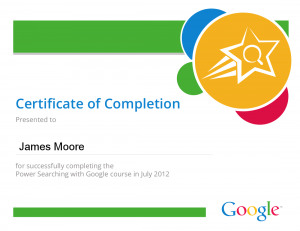
I received my certificate for successfully completing the “Power Searching with Google” online course. I decided to upload to the site rather than following Google’s suggestion to print out the certificate and affix to my wall.
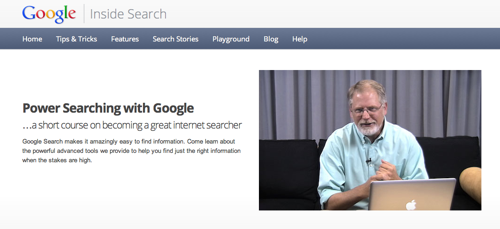
I was impressed with what Google put together. Essentially this was a MOOC (Massive Open Online Course) with short video presentations/tutorials immediately followed by short exercises to demonstrate learning. The element that I found less impressive was the use of Google Groups discussion boards – meaningful conversation was drowned out by the sheer number of participants. However, this criticism is endemic to MOOCS.
Also, Google did a great job at transcribing the videos. In some ways the written elements are an easier method to learn. Printing these out (or viewing them on a second screen) whilst watching the videos was a good way to learn.
I have signed up for the “Power Searching With Google” course that starts in July. I am very interested in seeing what is covered, and the types of people who will sign up. The cynical part of me assumes that there will be a significant SEO / Internet Marketing presence (looking for ways to optimize their organic search listings), rather than ordinary folks looking to search smarter/quicker/better. Anyway, my understanding so far is that the course officially launches on the 10th July, with a series of one-hour asynchronous sessions:
Class 1 available: July 10
Class 2 available: July 11
Class 3 available: July 12
Hangout on Air with search experts: July 13 3:00-3:45pm Central Time
Mid-class assessment due: July 17 at 9:59am Central Time
Class 4 available: July 17
Class 5 available: July 18
Class 6 available: July 19
Hangout on Air with search experts: July 19 1:00-1:45pm Central Time
Final assessment due: July 23 at 6:59pm Central Time
I am currently taking an online course, or rather a MOOC (Massively Open Online Course) this month. Full disclosure, I know the instructor, and have blogged about Curt before.
I am enjoying the course, and that is due to a couple of features. The primary reasons for my enjoyment to date are:
Week 0: The course has an introductory week, which I both admire and appreciate. Even though I have experience of Learning Management Systems (and online course design), the first time in any new course provides a degree of confusion. Like walking into a building for a first time, a quiet period for orientation is required to know exactly where to go and how to get there.
Effective use of video: Online courses can be a little text-heavy. I appreciate using video to communicate with students.
Icebreakers: There are 3000+ of us in the course. I know I won’t be able to read all of the introductions, but I feel like I am getting to know others in the course. Acceptance of Social Media. Conversation is also taking place outside of the LMS, using social media tools. Tags help aggregate the conversation (such as this one: #Bonkopen).
Synchronous and Asynchronous content: My preference is to asynchronous courses, which allow me to better manage my time, but the knowledge that there are (optional) synchronous elements helps push me to meeting deadlines.
Weekly email reminders: I am fairly organized, but regular prompts help me stay on schedule.
Reasons For Taking The Course
I am taking this course for two reasons:
To improve my knowledge and level of expertise, to as to better advise faculty who are teaching online.
Taking this course has been very helpful in changing my perspective – merely by being an online student again. I have a plethora of devices on which I can study and collaborate, but limited windows in which I can study. The times at which I can study are:
Early morning: 5 – 6 a.m. (before everyone else in the house is up)
On the way to work: 7 – 8 a.m. (On the El)
On the way back from work: 5 – 6 p.m. (On the El)
Last thing at night: 10 – 11 p.m. (everyone else in the house has gone to sleep)
The past week was a good opportunity to experiment with how well I could study at these times, and on the devices and in the environments made available to me. Here are the devices I use:
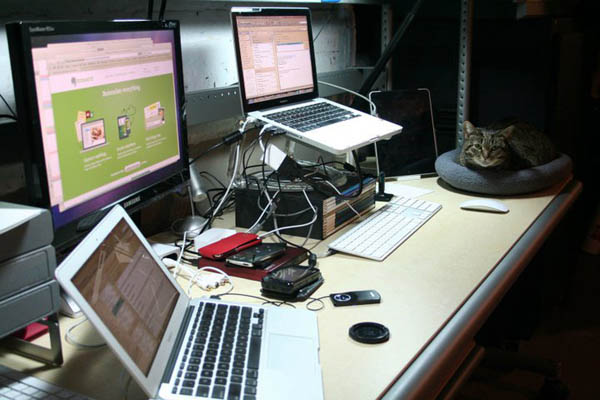
Dual Macs
Mac with dual monitors. In a quiet room at home (basement), this is the idea machine and environment in which to study and collaborate. The dual monitors allow me to place content on one screen, and write on the other screen. My home Internet connection is decent enough so as not to frustrate me whilst downloading and uploading, but this environment does not come with me…
MacBook Air
MacBook Air. Carried with me near everywhere. The screen is tiny, which can be a bit of a pain, but the device is lightweight and a pleasure to use. My cellphone provides a precarious Internet connection for the laptop whilst travelling on the El. If the train is not too crowded, I can get some work done on the Air on the way to and from work.
N900
Nokia N900 Cellphone. This aging device (has been my primary ‘phone for about three years) has an unlimited EDGE dataplan. Not the quickest device, but can get the job done. Has a great browser, nice screen, and keyboard. Lacks a spellchecker…
iPod Touch
iPod Touch. Second generation. Essentially an iPhone without the Phone. Again, my cellphone provides a precarious Internet connection whilst travelling on the El.
iPad
iPad. First generation. Essentially a super-sized iPod Touch. Again, my cellphone provides a precarious Internet connection whilst travelling on the El. Works best for consuming content rather than creating content. I don’t take it with me as often as the MacBook Air.
My Bold Plan
My bold plan was to see how well I could operate as a mobile student – accessing the CourseSites course whilst on the move. So far this has not worked as well as I might have hoped, but this is good. Mild frustration helps point out things that I could change in future courses (or at least prepare students for).
Mild Frustrations and Observations
Here are the issues I ran into along the way (sometimes just because I was looking for things to break):
1: Reading PDFs
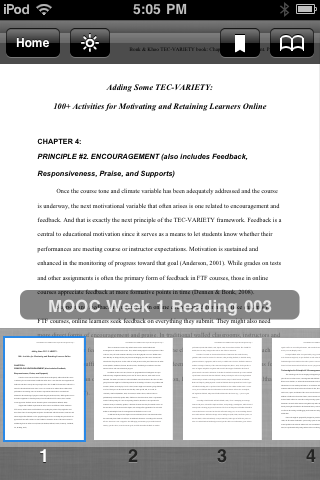
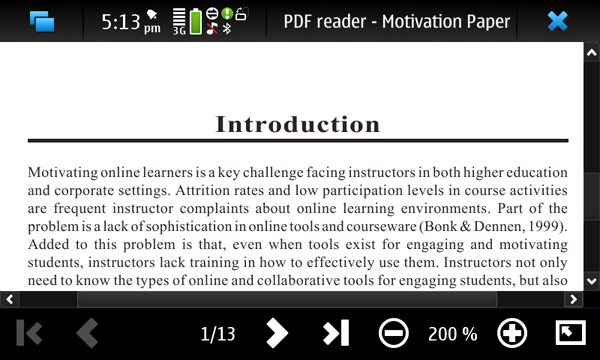
Reading PDF on the iPod Touch Kindle did not work for me
My first day of class I downloaded the PDF reading assignments to my laptop. I knew I was going to be travelling home on a packed train, so iPad and laptop use were not an option. Instead I thought I would use my iPod Touch to read the PDFs, so I sent them to the device via Amazon’s Send To Kindle service before leaving work’s WiFi cloud. This approach did not work for me, as the PDFs were too small to read on the screen (and I could not rotate the screen to read in landscape mode).
Reading PDF on the cellphone – not fun, but it worked
Reading PDF on the cellphone – not fun, but it worked
My fallback was to open the PDF with the cellphone – this worked, but reminded me how PDFs can sometimes be a pain to work with.
Lessons Learnt (for future courses)
When providing PDF handouts, provide the content in other formats that can be read more easily on mobile devices. HTML or epubs would have let me scale up the content to be legible on a device with a small screen. The issues here is whether this can be legally done, or if the content in the PDF can be easily converted.
2: CourseSites Navigation
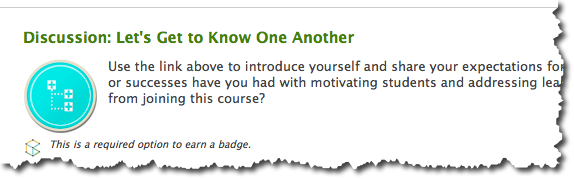
I found the layout and the organization of the course to be logical and efficient, but there is one aspect of Blackboard CourseSites that I found frustration – that is navigation to components of the course. One of the first assignments is to introduce yourself via the discussion board, but the directions to do that are less than ideal:
Use the link above to introduce yourself and share your expectations for the course.
Where the link is the heading (Discussion: Let’s Get to Know One Another). My frustration here is that the link is not apparent (no visual cues, beyond the mouse pointer changing form when hovering above the link). A better solution would be contextual links within the body of the text, for example:
Introduce yourself and share your expectations for the course through the discussion board.
(where discussion board is the linked text)
I think this is a constraint imposed by CourseSites, rather than a design decision.
Lessons Learnt (for future courses)
Ensure that navigation is contextual.
3: Mobile Applications
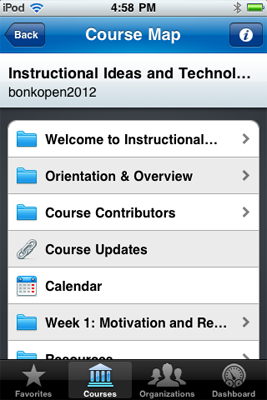
Using CourseSites on the iPod Touch
I did experiment with the Mobile Learn iOS app, but ultimately found using the browser on my cellphone to be an easier approach. Interaction did not work well on the mobile apps.
Lessons Learnt (for future courses)
Review online courses on a mobile device, and decide whether the app/LMS affords easy navigation and collaboration
4: Video Content
Lastly, there is one suggestion for improvement that I would suggest. I really enjoyed the video content, and that it was hosted on YouTube. This allowed for some collaboration and commentary to take place outside of the MOOC (which is a great idea). What I did not like was that I had to open a separate window to view the video outside of the LMS, my suggestion would be to embed the YouTube video in the LMS and provide a link to the YouTube page (for those who wanted to comment interact with the video directly from YouTube)
Lessons Learnt (for future courses)
Embed video.
Time For Bed…
Anyway, that is me for this post. This was more my thoughts and reactions to the LMS and instructional design. My next blog post will be about the actual reading and reflection (i.e. learning) that I am following in this course.
Monday through Wednesday was happily spent at the Desire2Learn (D2L) Fusion Conference. Work will be migrating from Blackboard to this (to my mind) superior Learning Management System. The change cannot happen too quickly for me.
Like all conferences, Fusion2010 was a mix of fascinating presentations and less-than-stellar presentations. Like most conference attendees I was in a constant state of partial attention – checking and tapping away on my mobile telephone. And here (according to one of the presenters) I age myself, because I use the term “mobile telephone.” To the younger generation all ‘phones are mobile. No distinction is necessary.
The ‘phone was essential – a device to record notes from the good presentations, and portal to escape through during the deathly dull presentations (though keeping one ear open for the occasional pearl of wisdom). Here are my assembled notes from the conference.
Monday
The D2L conference distinguishes itself from more prosaic conferences by being more playful and mentally stimulating. For example, each table at breakfast and lunch had 3-D architectural puzzles (Empire State Building, Taj Mahal, etc.) for participants to complete. Little touches like this made a noticeable difference.
The topic of the opening keynote by Stuart Brown (Play) resonated with me, but the meandering delivery and lack of engagement with the audience turned me off. Somewhere beneath the keynote was something valuable to share, but the keynote wasn’t working for me. Perhaps I should just read the book.
The organizers had asked for me to relate some of my D2L experiences on camera. I have no idea whether this will see the light of day….
Tuesday
The University of Wisconsin Colleges Online provided a well-prepared session on multiple-choice quizzes (“Advanced Use of the Feedback Feature in Multiple-Choice Quizzes”). The level of the session was lower than I had expected, but the presenters did well in creating useful handouts and an example account for participants to experiment with. I share their feedback suggestions here:
Write multiple-choice questions that have four (or more) viable alternatives for the answers.
Try to avoid the use of “all of the above” or “none of the above.” These alternatives prevent you from using the option to scramble the answers on the quizzes/exams.
If you want to use all the alternatives, you can spell them out that in a way that includes the appropriate language.
For the correct alternative you do not need to provide any feedback at all. You can use the “Question Feedback” instead, which will be visible to all students, regardless of whether their response was correct or incorrect.
For the incorrect alternatives you should focus on explaining why the answer is inappropriate.
Do not include page numbers, page references, or chapter references in the general question feedback. This level of detailed information is tough to “repair” later.
You might want to tie questions into learning outcomes. This is your choice, but it will make a revision harder later.
Julie Evans, Chief Executive at Project Tomorrow, was our lunchtime keynote speaker. I found her findings to be both interesting and helpful – paralleling some of my observations at work.
One of the most helpful sessions of the day was “Tips and Tricks for Administrators,” which provided me with a deeper understanding of D2L.
Wednesday
D2L had provided all attendees and presenters with access to the D2L LMS, with the intention to share, collaborate and discuss. Whilst this is a great idea, the concept did not really seem to work – a few days later there seemed to be little interaction on the site, and less handouts/documentation from presenters than I had hoped for.
Lunch was particularly entertaining. The keynote speaker (Joel Cohen, writer and co-executive producer on The Simpsons) had the audience in his hand with “The Business Tao of Homer: Lessons in Creativity and Innovation From The Simpsons.”
Anyroad, I enjoyed my first Fusion conference and look forward to more.
Last week I had the pleasure of meeting some cool folks who were thinking about how best to design technology to support learning in the future. The group came from disparate backgrounds under the moniker of “Meeting of the Minds.” Like ripples on a pond, I find the ideas we discussed reverberating in my mind – expanding and colliding off other ideas.
To me, the future is five minutes away. To my mind, the educational process is broken – we are largely following a model developed more than a century go that was designed to impose conformity and train future generations to labor in factories and fight in wars. Talking about ways to fix things was extremely refreshing.
Anyroad, there is now a background buzz in my brain. I am looking forward to continuing the conversation.